V21 Artspace and Hospital Rooms: a longstanding partnership, a new digital experience

Donating our work to Hospital Rooms, we have captured Host / Guest at Victoria Miro and launched our custom digital exhibition system, bringing artworks, stories and films to audiences wherever they are.
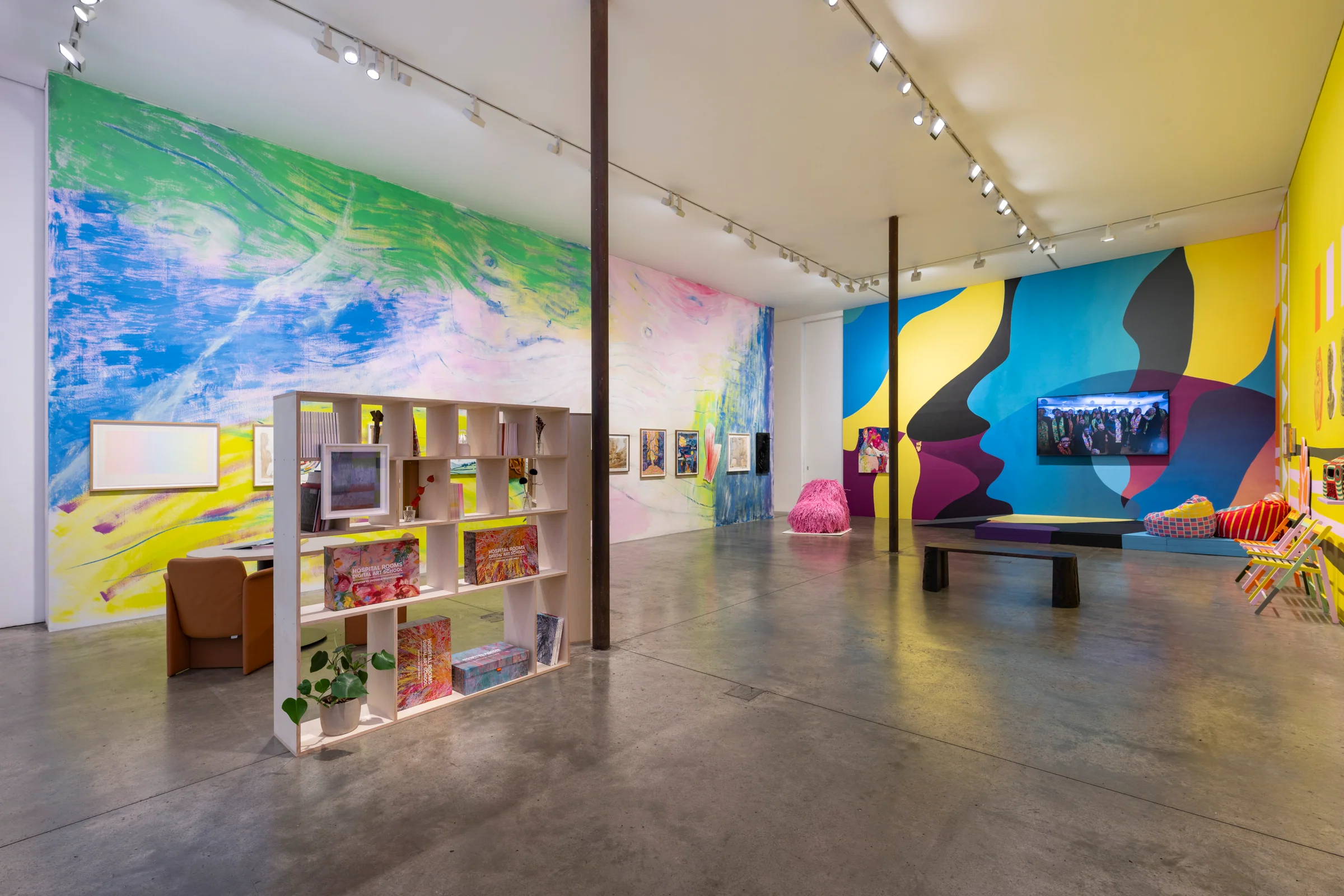
V21 Artspace is delighted to present the digital edition of Hospital Rooms: Host / Guest at Victoria Miro, continuing our longstanding partnership with the arts and mental health charity. We have donated our work on this project, capturing the exhibition and creating an interactive experience that people can explore wherever they are.
Marking Hospital Rooms’ tenth anniversary, Host / Guest offers a window into an extraordinary programme of art made for NHS inpatient mental health settings. Much of this work is experienced day to day by patients and staff within those environments. The exhibition, and now its digital counterpart, brings that work and its stories to a wider audience.
A partnership built around the value of art
Supporting Hospital Rooms means supporting the place of art in everyday life, including at times when people may be most vulnerable. Art can invite reflection, hold personal meaning and help us connect with experiences that are difficult to put into words. We are proud to contribute our skills to a charity that takes those possibilities seriously.
The digital exhibition gives visitors time and space to look closely, return to a work and discover more about the artists and Hospital Rooms’ projects. It also offers a route into the charity’s anniversary auction through the accompanying exhibition information.
Capturing the exhibition, developing the experience
Our process began with capturing the physical exhibition using Matterport, preserving the relationships between the artworks, installation and gallery architecture. We then connected that spatial record with approved artwork photography, captions, contextual information and six Hospital Rooms films.
We are delighted to launch V21 Artspace’s custom viewing and annotation system with this exhibition. Developed by V21 in conjunction with Matterport’s SDK and Model API, it makes the space itself a way into the content: visitors can select a work, zoom into photographs, move between nearby artworks and open the film programme from the gallery screen.
Matterport provides the captured environment and underlying 3D engine. V21’s custom code shapes the visitor interface, mapped artwork interactions, navigation and media presentation. The result builds on our experience of documenting exhibitions while giving us greater scope to adapt each digital experience to its content and audience.
Click the object. Discover the story.
Visitors can select an artwork or object in the scene to open its information. Our editor maps interactive areas to positions in the 3D environment, including rectangular surfaces and traced outlines for irregular works. These areas remain attached to the space as the visitor changes viewpoint.
A visual menu offers another way in. Visitors can browse the content, move to a chosen work and open its details when they are ready. Previous and next controls follow an order derived from the objects’ physical positions. Preferred viewing positions can be saved in the editor, bringing visitors to the intended side and framing of a work.
An interface designed around the visit
The tour fills the available browser window. On desktop, a generous information panel places the image alongside its details. On mobile, the layout keeps navigation compact and presents information in a panel suited to the smaller screen. The artwork list stays closed until it is needed, leaving the space at the centre of the experience.
Custom development using Matterport’s SDK and API
The viewer is built by V21 Artspace using Matterport’s Showcase Bundle SDK and Model API. Matterport provides the captured environment and underlying 3D viewer. V21’s code controls the surrounding interface, object interactions, camera journeys and information panels.
The SDK connects our interface to the 3D scene and camera. Our code tests clicks and taps against mapped artwork surfaces, while the Model API saves centre anchors back to Matterport. The larger outlines, preferred viewpoints and associated content are stored in V21’s own project system. The web application is built with Next.js and TypeScript, with Supabase for project data and CMS authentication, and Vercel Blob for optimised images.
A separate editor uses the V21 CMS login. It brings projects, media, artwork information and placement tools into one workflow, while visitors receive a dedicated viewing link. This reduces the need to build and maintain a separate interactive presentation for every annotation.
Built for exhibitions. Adaptable to other spaces.
Artworks are one application of the system. The same approach can be adapted for museum objects, heritage interpretation, education, visitor orientation and commercial environments. The relevant point of interest might be an exhibit, a room, a product or a piece of equipment.
The V21 interface can be fully adapted to each client’s brand, content and audience: page layouts, visual styling, menus, content fields, navigation and interaction design can all be shaped around the brief. We can develop additional interactions where a project needs them, with the scope agreed for each client.
From a visual tour to structured knowledge
A digital twin can carry more than a visual record. V21 links named artworks and other points of interest to structured content, stable identifiers and positions within the Matterport space. Matterport’s Model API provides programmatic access to model data; our content system adds the editorial context that explains what visitors are looking at.
This creates the foundation for a machine-readable interpretation layer around the model. With appropriately published text, metadata and data connections, that information can support collection search, related-content discovery and AI-assisted retrieval that refers people back to the source. Improved visibility depends on what is made publicly accessible, its quality and how external services index it; it is not an automatic search-ranking benefit or a claim that the model is used to train AI.
More ways to access the experience
The aim is to make artworks and their stories accessible to a global audience through remote access, multilingual interpretation and inclusive design.
Remote access, readable information panels and a named artwork menu give audiences more ways to explore a place and its stories. The interface can be developed further around accessibility needs, including text alternatives, captions, transcripts, audio description and clear keyboard navigation.
Accessibility is part of the content and interaction design, not simply a property of a 3D scan. We agree the requirements with each client and test the complete experience, including embedded players and documents, against that brief.
Content beyond photography
The custom interface is not limited to a photographic presentation. It can be extended to connect a point in the space with an interactive 3D model, video, audio, a PDF or other supporting material—for example, a sculpture that can be rotated, an artist interview, spoken interpretation or a gallery guide.
The Hospital Rooms experience includes artwork images, captions, inline zoom, carousels and a programme of six Vimeo-hosted films, presented within the V21 interface. Further integrations, such as audio, PDFs and interactive 3D objects, can be scoped for other projects with attention to performance and access requirements.
See the live interface
Explore Hospital Rooms: Host / Guest or open the full-screen digital exhibition. The live experience includes the final artwork photographs, information and films.
Explore our interactive 3D virtual tour services or talk to V21 Artspace about a custom tour interface.